
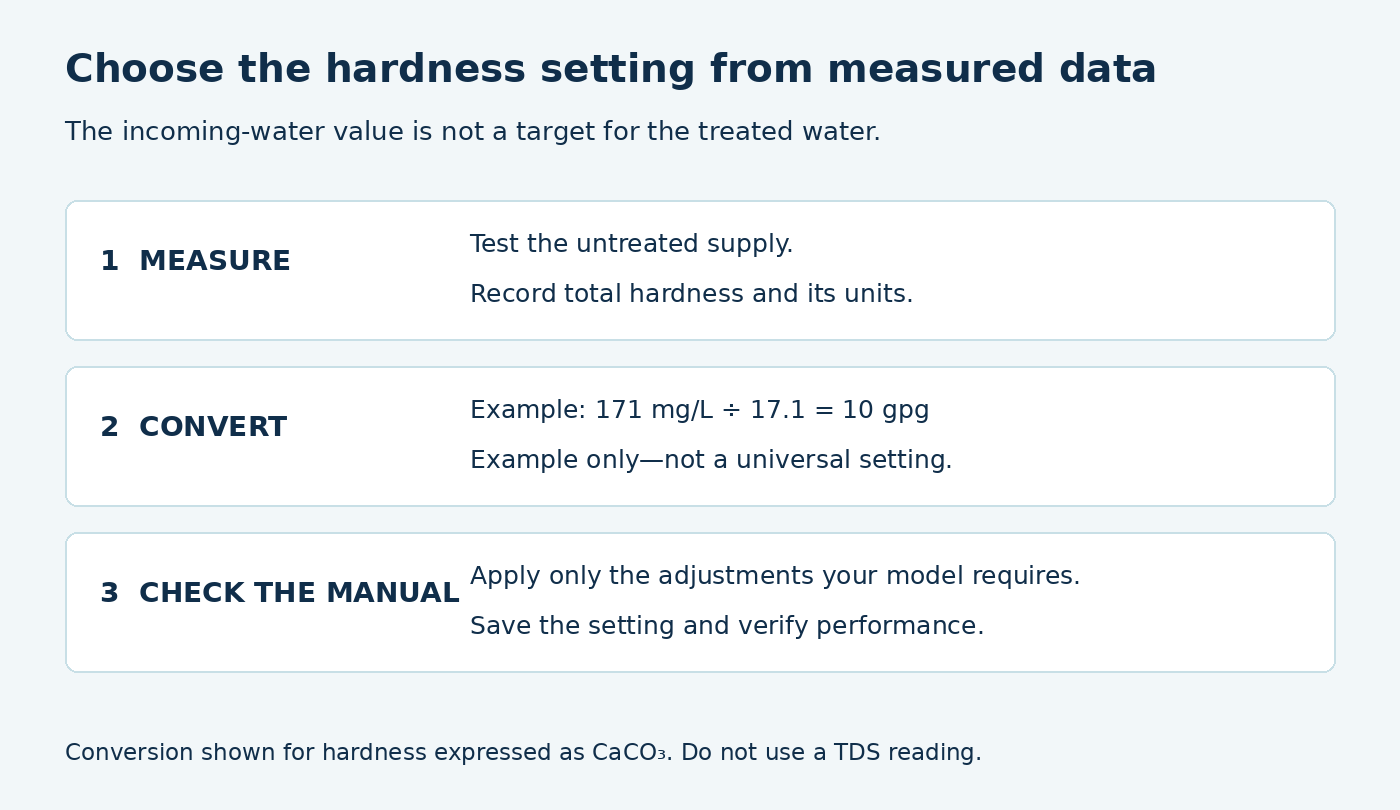
The right water softener hardness setting starts with the hardness of the untreated water entering your system. Convert the test result to the controller’s units, apply only the adjustments required for your model, and enter that value. Do not choose a higher number simply because you want softer water. Rheem explains that its hardness setting helps determine recharge frequency rather than serving as an output-softness dial. [1]
This guide covers programmable home softeners with a hardness input. Not every controller uses the same units, menu, or correction rules.
Diagram above: Illustrative conversion only. The final setting depends on your supply and the model’s instructions.
If you are choosing a new unit, use the incoming hardness and your water bill to calculate the grain capacity your household needs.
What does the hardness setting control?
The controller uses the incoming-hardness value to estimate the treatment demand on the softener. Rheem notes that an unnecessarily high setting causes more recharges and uses more salt and water without necessarily producing softer water. [1]
A blending valve is different. On certain GE models, a separate adjustment mixes a small stream of hard water with softened water to change the hardness delivered to the home. That is a physical blending function, not the same as entering incoming hardness in the controller. Consult the specific valve instructions before adjusting it. [2]
Find your incoming water hardness
Use a total-hardness result from a confirmed untreated-water sampling point. Do not program the system from a sample already softened: that describes the result of treatment, not the load entering the equipment.
Whirlpool’s programming guide directs owners to obtain hardness and clear-water iron information. It recommends contacting the supplier for municipal water data or obtaining testing for well water. Keep the source, date, units, and sampling location with the result. [3]
If the water report supplies a range rather than one value, ask the supplier or installer which value is appropriate for programming. Do not invent an average or substitute a TDS reading for total hardness.
Hardness unit converter
Convert total hardness expressed as calcium carbonate (CaCO₃). This does not convert TDS or select a softener setting.
Enter your own figures, then select Calculate.
JavaScript is off. gpg = mg/L as CaCO₃ ÷ 17.1; mg/L as CaCO₃ = gpg × 17.1. Rounding does not improve test accuracy.
Calculations run in this page. These entries are not submitted to us or saved by this tool. Reloading clears them.
Convert your result to the controller’s units
Rheem and Whirlpool’s cited programming instructions use grains per US gallon, or gpg. They convert hardness reported in mg/L or ppm as CaCO₃ by dividing by 17.1. Check the units your own controller expects before entering a number. [3] [4]
| Measured hardness as CaCO₃ | Calculation | Hardness in gpg |
|---|---|---|
| 171 mg/L | 171 ÷ 17.1 | 10 gpg |
| 256.5 mg/L | 256.5 ÷ 17.1 | 15 gpg |
| 342 mg/L | 342 ÷ 17.1 | 20 gpg |
These are calculation examples, not recommended settings for every home. If your converted result falls between values the controller accepts, follow the manufacturer’s rounding rule. Converting units does not make an imprecise measurement more exact.
Check for model-specific adjustments
Do not apply one iron multiplier to every softener. Rheem’s iron-programming guide specifies an adjustment for measured ferrous, or clear-water, iron: for its covered equipment, each ppm contributes five additional units to the hardness programming value. [5]
The worksheet below keeps the measured hardness separate from this programming compensation; the compensation is not a laboratory measurement of extra hardness.
Confirm that your system is suitable for the measured iron concentration and form. Do not estimate iron from staining or assume this adjustment makes the equipment suitable for any iron problem.
Salt choice and refill guidance also matter. Rheem’s hardness guide includes a separate potassium-chloride adjustment for its equipment. Our potassium chloride versus sodium chloride guide explains what to check before switching regenerants. Use the instructions for the model and regenerant you actually have; do not add a percentage from another brand or add the same compensation twice. [4]
Identify the setting on your controller
| Documented equipment | Hardness field | Do not confuse it with |
|---|---|---|
| Whirlpool WHES40 / WHES44 | HARDNESS screen reached with PROGRAM; printed p. 13. [7] | Recharge time or the salt-level indicator |
| Rheem equipment covered by its programming guide | Hardness screen reached with Program/Select. [4] | An output-softness control; the guide uses incoming hardness and its specified adjustments |
| Pentair 5600SXT system in the cited manual | H in User Programming; availability depends on configuration. [8] | DO (day override), RT (regeneration time), or RC/SF (reserve). Do not alter master settings to make an absent field appear. |
Match the system manual as well as the faceplate. A controller name alone does not establish how a particular installer configured the equipment. The Pentair manual directs users to contact a water professional before Master Programming. [8]
How to enter the hardness setting
1. Locate the correct menu
Find the model number and open its programming instructions. Record the current setting before changing it. Make sure you are viewing hardness rather than salt level, capacity, recharge time, or a maximum-days override.
2. Enter the verified value
Use the controller’s stated units and the final calculation approved for that model. On the Rheem units described in its iron guide, the Select button reaches the hardness screen and the arrow buttons change the value. This is a model-specific example, not a button sequence for all softeners. [5]
3. Save and confirm
Finish the menu sequence described by the manufacturer and return to normal operation. Where the controller allows it, reopen the setting to confirm that the intended value was saved. Keep a note of the old value, new value, test result, and reason for the change. If you are checking saved settings after an outage, follow our guide to restoring a water softener after a power interruption.
What happens if the setting is too high or too low?
Too high: on the Rheem equipment described above, the softener can recharge more often than needed, increasing salt and water use. Increasing the number is therefore not a sensible default response to a water-feel complaint. [1]
Too low: the controller can underestimate the actual hardness load. As a consequence of using hardness to plan recharging, this can leave the equipment trying to treat more water than its available capacity supports. This is a reason to verify the input, not deliberately understate hardness to reduce salt use.
An unexpected treated-water result does not prove the setting is the only problem. Bypass position, salt condition, flow registration, and regeneration also affect operation. [6]
Check performance after changing the setting
Follow your model’s recovery instructions rather than assuming a menu change instantly restores exhausted resin. Rheem’s operational check includes a prescribed recharge followed by hardness testing at faucets. Let any required cycle finish and test water from a confirmed treated outlet using the test kit’s directions. [6]
Compare repeat measurements in the same units and at the same sampling location. Record whether the system completes its automatic cycles and whether the original symptom returns. If performance remains poor, continue the manufacturer’s troubleshooting sequence or contact support instead of increasing the number repeatedly.
Check the calculation before saving
Keep the measured water result, the programming calculation, and the saved screen value as separate records. This makes it possible to find a unit error or a duplicated adjustment later.
| Step | Illustrative input or calculation | Check before continuing |
|---|---|---|
| 1. Incoming hardness | 171 mg/L as CaCO₃ ÷ 17.1 = 10 gpg | The sample must represent untreated supply; TDS is not this input |
| 2. Confirmed clear-water iron | For a model using the five-unit rule, 1 ppm × 5 = 5; subtotal 10 + 5 = 15 | Use measured iron and verify that the model can treat its form and concentration. [5] |
| 3. Regenerant | Under Rheem’s cited KCl instruction, 15 × 1.25 = 18.75 before model-specific rounding; do not apply this KCl adjustment when using NaCl | Confirm the actual salt and the applicable rule. Do not count compensation twice. [4] |
| 4. Save and verify | Record the old screen value, the final value accepted by the controller and the manual’s rounding instruction | 18.75 is an arithmetic result, not a universal number to enter |
Do you have an untreated hardness result, the controller’s expected units, the required iron/salt rules, and its rounding instruction? If any is unknown, obtain that missing item before choosing a new value. An unchanged factory setting is appropriate only if it matches the verified installation requirements. Repeat the check when the water source or measured conditions change.
After the model’s required recovery, record a treated-water test separately. If that result is unexpected, check the supply route and completed regeneration before adding more compensation. Keep the worksheet with your maintenance record.
Hardness programming worksheet
Keep the measured result, calculation and saved controller value separate. Use the converter above if needed; this worksheet does not select or apply an automatic setting.
Open the fill-in record and download a copy
Use “unknown” for details you cannot confirm. Entries stay in this page and are not submitted by this tool. Download a text copy before leaving; reloading clears the record.
No record prepared yet.
JavaScript is off. Copy the field labels into your own notes and keep your record there. The download buttons require JavaScript.
Sources and programming instructions
Documentation for the additions below checked October 17, 2026. Apply only the instructions that match your equipment.
- Rheem: What a higher hardness setting changes
- GE Appliances: Blend Adjusting Knob
- Whirlpool: Hardness Level Programming
- Rheem: Hardness Level Programming
- Rheem: Iron Level Programming
- Rheem: Checking softener operation
- Whirlpool WHES40 / WHES44 manual, document 7392319, printed p. 13: hardness screen
- Pentair 5600SXT Softener System manual, printed pp. 10–11: User Programming fields and Master Programming caution
Updated October 27, 2026: added a fill-in hardness programming worksheet with a downloadable text copy. Manufacturer-based guidance is not a report of hands-on testing.